








LK03XL Battery for HP Envy X360 Convertible 15m-cn0012dx 15m-cn0011dx 15m-bp112dx 15m-bq121dx 17m-ae0xx 916814-855 916368-421
- Batterytype: BatteryPack
- High-concerned chemical: None
- Part Number: LK03XL
- Package: Yes
- Model Number: LK03XL
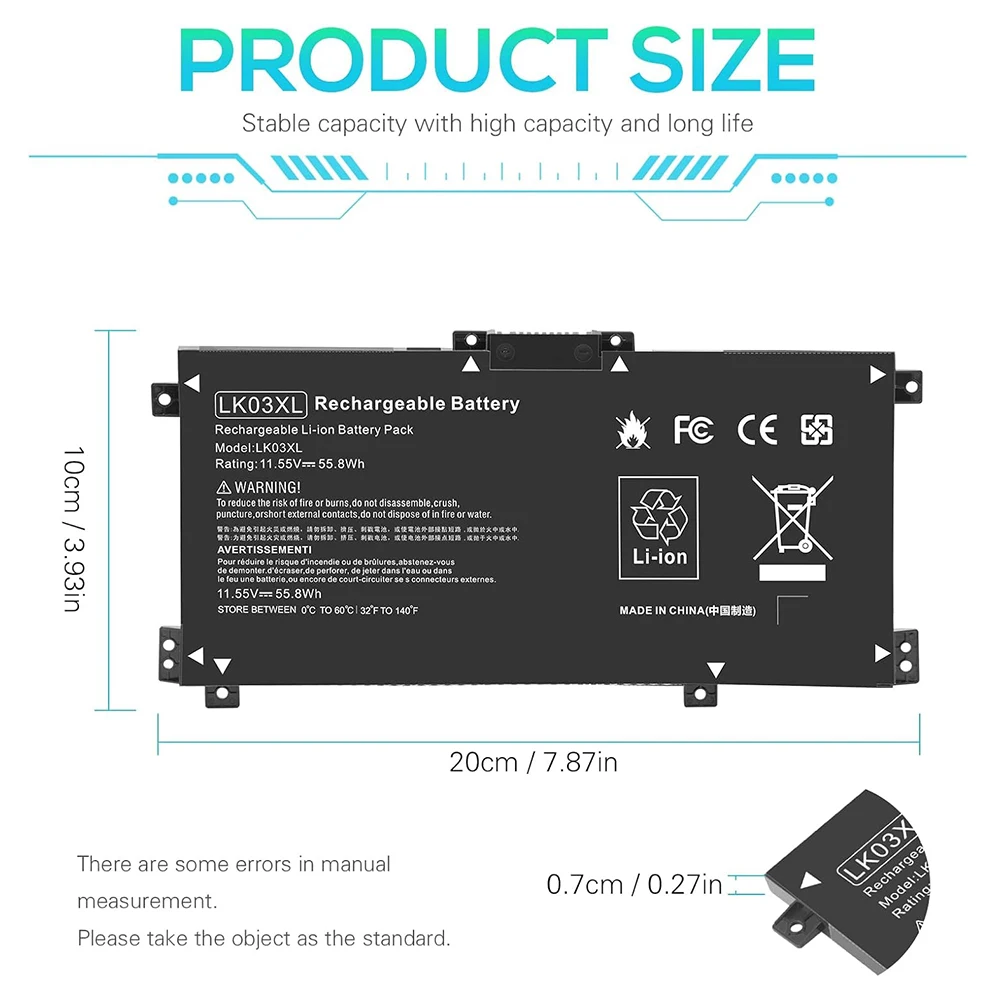
- Battery Voltage: 11.55V
- Compatible Brand: HP
- Type: Li-Polymer
- Brand Name: DIXSG
- Origin: Mainland China
- Certification: CE
- Features 1: 100% New from Manufacturer
- Features 2: Grade A++ Cell
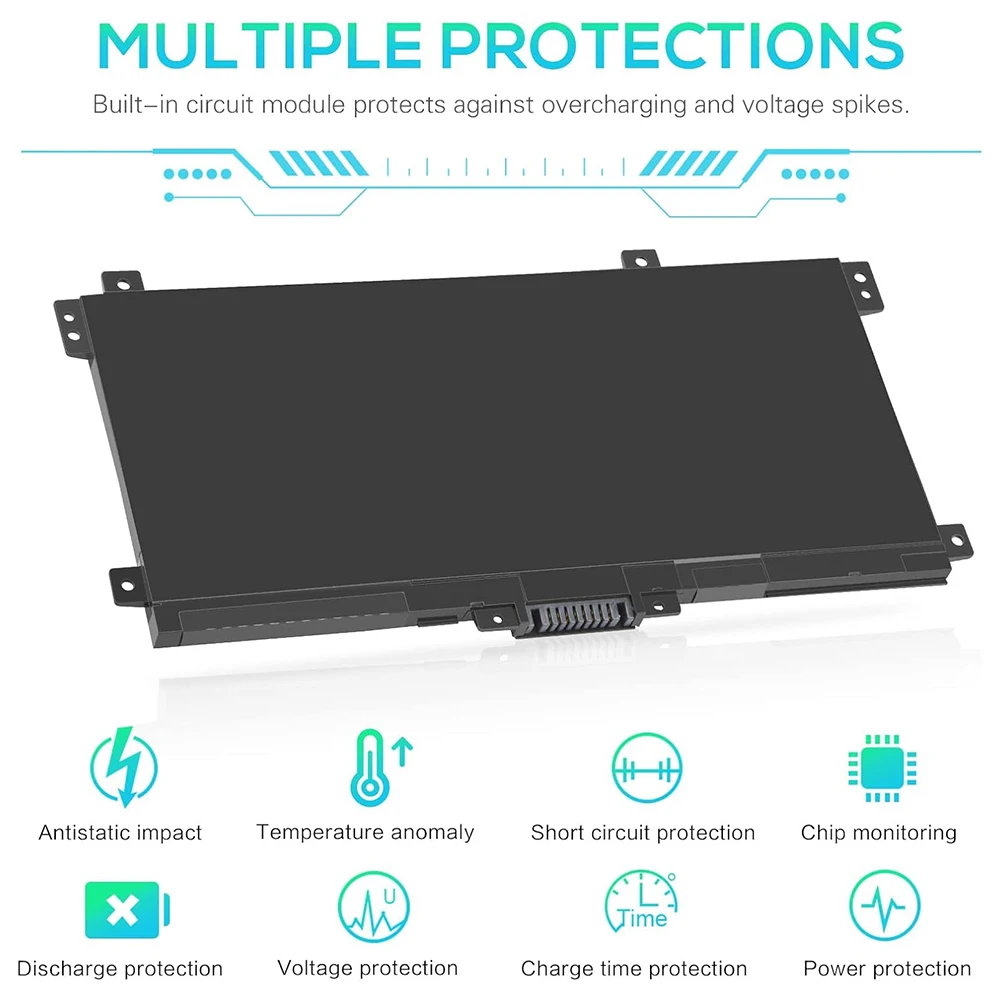
- Features 3: Our batteries are designed for maximum safety
- Features 4: Overcharge and Overdischarge Circuit Protection
- Features 5: Over-temperature and Short-circuit
- Features 6: Economical alternative
- Features 7: 100% compatible
- Features 8: Specifications for safety and performance
Compatible With Part Numbers:
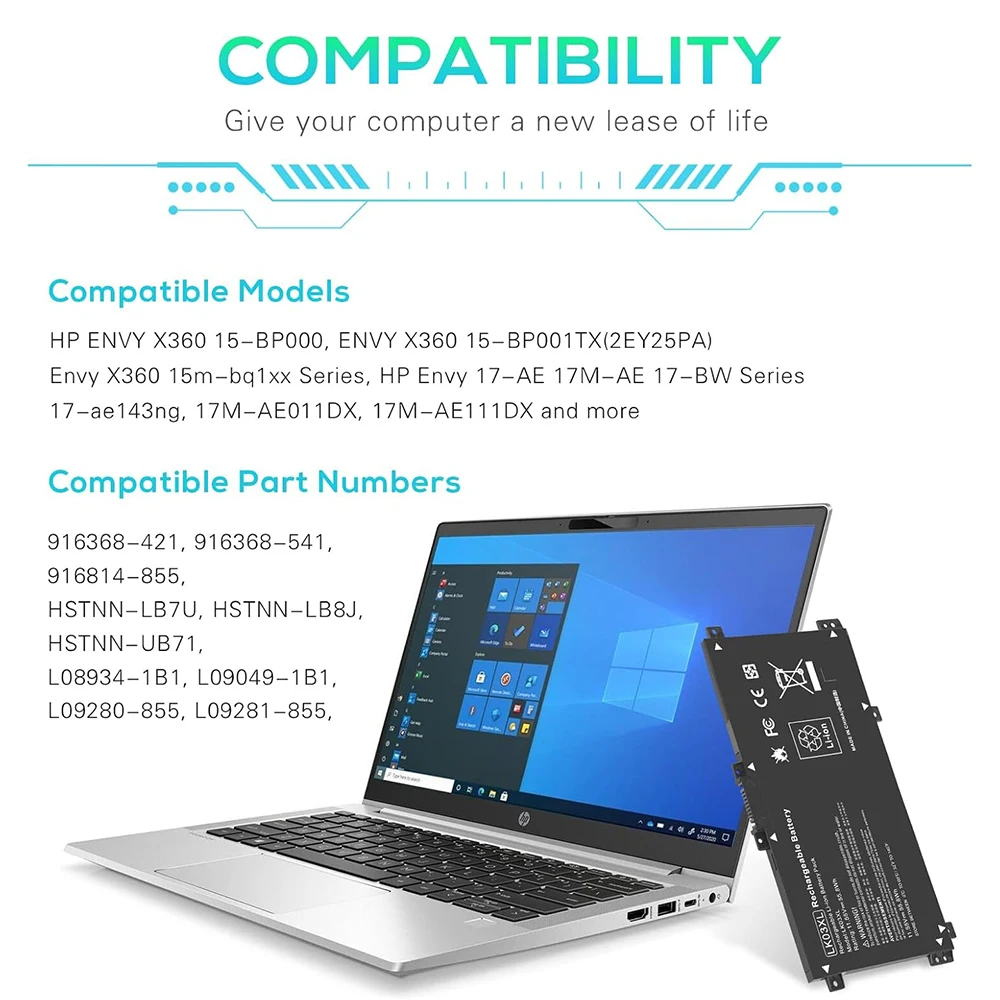
LK03XL LKO3XL L09281-855 916814-855 LK03048XL LK03055XL 916368-421 916368-541 HSTNN-LB7U HSTNN-LB8J HSTNN-UB71 HSTNN-UB7I L08855-856 L08934-1B1 L08934-2C1 L09049-1B1 L09280-855 L09911-141 L09911-421 TPN-W127 TPN-W128 TPN-I129
Compatible Laptop Models:
for HP Envy X360 15-bp 15m-bp Series:
15-bp0xx 15-bp1xx 15m-bp0xx 15m-bp1xx 15-bp143cl 15-bp152wm 15-bp194cl 15-bp165cl 15-bp112dx 15-bp001tx 15-bp002tx 15-bp003tx 15-bp004tx 15-bp005tx 15-bp006tx 15-bp107tx 15-bp100tx 15-bp105tx 15-bp101tx 15-bp103tx 15-bp104tx 15-bp106tx 15-bp102tx 15-bp013tx 15-bp103ur 15-bp195nia 15-bp003nx 15-bp004na 15-bp101nia 15-bp102ng 15-bp109ur 15-bp017tx 15-bp030nd 15-bp104nw 15-bp131ng 15m-bp000 15m-bp012dx 15m-bp011dx 15m-bp111dx 15m-bp112dx.
for HP Envy X360 15-bq 15m-bq Series:
15-bq0xx 15-bq1xx 15-bq000nb 15-bq001na 15-bq000no 15-bq000ur 15-bq001nb 15-bq213cl 15-bq150na 15-bq075nr 15m-bq0xx 15m-bq1xx 15m-bq121dx 15m-bq021dx
for HP Envy X360 15-cn 15m-cn 15t-cn Series:
15-cn0xxx 15-cn1xxx 15m-cn0xxx 15m-cn1xxx 15t-cnxxx 15t-cn000 15t-cn100 15-cn0013nr 15-cn1025cl 15-cn1035cl 15-cn1055cl 15-cn1073wm 15-cn0000tu 15-cn0000tx 15-cn0001la 15-cn0001na 15-cn0001tu 15-cn0001tx 15-cn0002tu 15-cn0002tx 15-cn0003ca 15-cn0003tu 15-cn0003tx 15-cn0004tu 15-cn0004tx 15-cn0005tu 15-cn0005tx 15-cn0006tu 15-cn0006tx 15-cn0007tu 15-cn002la 15m-cn0011dx 15m-cn0012dx
for HP Envy X360 15m-cp 15z-cp Series:
15m-cp0xxx 15m-cp0011dx 15m-cp0012dx 15m-cp0012dx 15z-cp000 15z-cp0xxx
for HP Envy X360 17-ae 17m-ae 17t-ae Series:
17-ae0xx 17m-ae0xx 17-ae1xx 17m-ae1xx 17-ae001nb 17-ae001nf 17-ae006ng 17-ae107nb 17-ae002no, 17-ae000 17-ae003ng 17-ae004ng 17-ae005ng 17-ae006ng 17-ae007ng 17-ae009ng 17-ae030ng 17-ae031ng 17-ae100, 17-ae101ng 17-ae102ng 17-ae103ng 17-ae120nd 17-ae130ng 17-ae131ng 17-ae140ng 17-ae141ng 17-ae142ng 17-ae143ng 17-ae165nr 17-ae120nr 17-ae001nia 17-ae011nc 17-ae101ns 17-ae102nw 17-ae155cl 17m-ae011dx 17m-ae111dx 17m-ae011xx 17t-ae000 17t-ae100
for HP Envy X360 17-bw 17m-bw 17t-bw Series:
17-bw0xxx 17m-bw0xxx 17t-bw0xx 17-bw0003ca 17-bw0008ca 17-bw0011nr 17-bw0503na 17-bw0707nz 17m-bw0013dx 17-bw0001ng 17-bw0004na 17-bw0006nf 17-bw0012nf 17t-bw000
for HP Envy X360 17-ce 17m-ce 17t-ce Series:
17-ce0xxx 17m-ce0xxx 17t-ce0xx 17-ce0002ca 17-ce0003ca 17-ce0008ca 17-ce0015nr 17m-ce0013dx 17m-ce1013dx 17t-ce000 17t-ce100
for HP Pavilion X360 15-cr Series:
15-cr0xxx 15-cr0037wm 15-cr0006tx 15-cr0052od 15-cr0160nb 15-cr0051od 15-cr0091ms 15-cr0035nr 15-cr0053wm 15-cr0087cl 15-cr0013nq 15-cr0014nq 15-cr0015nq 15-cr0017nr 15-cr0023nq 15-cr0027nq 15-cr0031nq 15-cr0033nq 15-cr0051cl 15-cr0055od 15-cr0056wm 15-cr0060nia 15-cr0062st 15-cr0064st 15-cr0070nb 15-cr0075nr 15-cr0076nr 15-cr0077nr 15-cr0078nr 15-cr0079nr 15-cr0081cl 15-cr0083cl 15-cr0085cl 15-cr0088cl 15-cr0095nr 15-cr0100ng 15-cr0130nd 15-cr0149nb 15-cr0161nb 15-cr0163nb 15-cr0211ng 15-cr0216ng




How to purchase the correct of battery?
Fine, how to check your laptop model?
Step 1: Press Windows + R to open Run window.
Step 2: Input "msinfo32" in the empty box and click OK to open System Information.
Step 3: Keep in the System Summary section, and you will find the System Model item in the right pane.
Why the laptop does not recognize the battery?
Could be caused by battery loose. Please re-install the battery and make sure that the battery cable and the motherboard interface are tightly inserted.
Maybe due to conductive material damaged which the laptop motherboard and battery anode and cathode contact position, you can try to confirm it with your original battery.
Check whether the battery drive is in normal condition, if not, download the corresponding driver software to update.
There is a problem with the computer detection software, which usually just restart the computer.
Tip :You have to find your specific laptop model before ordering a correct battery
How to use the new battery correctly?
Laptop Battery Maintenance Tips:
1. When using your new battery for the first time, you need to prime the battery by charging it to 100% and discharging it to 20% for 3 times. If you don’t know how to install a new laptop battery, you can search "How to install a new laptop battery?" on website.
2. DO NOT let the battery drain to 0%: If you constantly let it drain to 0%, the battery becomes unstable will be seriously degraded.
3. DO NOT keep your battery always fully charged: Just like emptying your battery to 0%, keeping your battery permanently charged at 100% is very harmful. As time goes by, this will increase its internal resistance and reduce its capacity.
4. Perform regular charging cycles: If you don’t use your Laptop battery very often, it is important to cycle it (discharge => charge) regularly, at least once a month. Please store the unused battery fully charged. Do not store at low power to prevent reduce the lifespan of a battery.
5.The battery life depends on how you use your laptop. If you open a lot of software at the same time, in the office, while listening to music, while browsing the Internet, also watching a movie, then the battery will drain fast; If you don’t have a lot of software running on your computer, and you’re only on standby or browsing the web, the battery will last longer.
Easy Ways To Maximize Battery Life:
1. Change your laptop power plan settings. I would suggest you choose the power saver plan. Then Change advanced power settings, scroll down to find Processor power management. Click the On-battery option and reduce the processor state to 20%.
2. Always keep your laptop neat and clean. The dust easily enters the hardware through the vents which are meant to release the heat generated from various computer components. It then blocks the vents preventing the outflow of the heat. This damages the computer parts including the battery.
3. Close Wi-Fi, Bluetooth, and other settings. You should keep the Bluetooth and WiFi off when you’re watching movies or doing other things which don’t require network connectivity. This can help your computer save precious battery life.
| color | LK03XL 11.55V 55.8Wh |
|---|---|
| Batterytype | BatteryPack |
| High-concerned chemical | None |
| Part Number | LK03XL |
| Package | Yes |
| Model Number | LK03XL |
| Battery Voltage | 11.55V |
| Compatible Brand | HP |
| Type | Li-Polymer |
| Brand Name | DIXSG |
| Origin | Mainland China |
| Certification | CE |
| Features 1 | 100% New from Manufacturer |
| Features 2 | Grade A++ Cell |
| Features 3 | Our batteries are designed for maximum safety |
| Features 4 | Overcharge and Overdischarge Circuit Protection |
| Features 5 | Over-temperature and Short-circuit |
| Features 6 | Economical alternative |
| Features 7 | 100% compatible |
| Features 8 | Specifications for safety and performance |
Waxaan ku dadaaleynaa inaan hubinno in alaabtayadu ay buuxiyaan filashooyinkaaga. Haddii aad ogaato in iibsigaagu uusan ahayn sidii lagu sharraxay, waxaad ku soo celin kartaa 1 maalin gudaheed marka la helo. Shayga waa in aan la isticmaalin, baakadkiisii asalka ahaa, iyo xaalad la mid ah tii aad heshay. Fadlan la xiriir kooxdayada adeegga macaamiisha si aad u bilowdo habka soo celinta oo aad u hesho oggolaansho soo celin. Marka aan helno shayga la soo celiyay, waan baari doonnaa oo waxaan ka shaqeyn doonnaa soo celintaada ama is-weydaarsigaaga 14 maalmood gudahood. Siyaasadaha soo celinta iyo soo celinta
We strive to ensure our products meet your expectations. If you find that your purchase is not as described, you may return it within 7 days of receipt. The item must be unused, in its original packaging, and in the same condition that you received it. Please contact our customer service team to initiate the return process and obtain a return authorization. Once we receive the returned item, we will inspect it and process your refund or exchange within 5 business days.
Read MoreRelated products
-
NETUM Book Scanner T101 Autofocus Document Scanner Max A4 A3 Size with Smart OCR Led Table Desk Lamp for Family Home Office
$197.544.490 Sold -

Remote Control Holder, Remote Caddy, TV Remote Organizer Table Desktop, Storage Box for Makeup Brushes, Office Supplies
$25.074.630 Sold -
Xprinter 365B Thermal Label Printer Barcode Sticker Receipt Printer Support 20-80mm 2 In 1 Print Machine for Android iOS Windows
$130.654.570 Sold -
NETUM Book Scanner T101 Autofocus Document Scanner Max A4 A3 Size with Smart OCR Led Table Desk Lamp for Family Home Office
$205.284.520 Sold -

1PCS Portable Transparent Makeup Brush Storage Box With Cover Eyebrow Pencil Makeup Brushes Organizer Chopstick Case Beauty Tool
$8.474.750 SoldThis product has multiple variants. The options may be chosen on the product page
Free Shipping
-

PU Leather Makeup Brush Bucket Portable Travel Cosmetic Bag Multi-Function Dust-Proof Waterproof Makeup Brush Cylinder
$31.704.520 Sold
81 reviews for LK03XL Battery for HP Envy X360 Convertible 15m-cn0012dx 15m-cn0011dx 15m-bp112dx 15m-bq121dx 17m-ae0xx 916814-855 916368-421